About the project
A record is selected from the table and edited in a form. Cancelling must leave the original record unchanged. The table needs to recalculate its size after Ionic navigation.
Schedule, filters and edit forms. On desktop the app sits in a phone frame; on mobile it fills the screen. Data is local test data; the scheduling backend is not connected.
- Demo credentials test / test are not an authentication system.
- 180 synthetic laboratory records and four BCP examples are not production data.
- Unimplemented sections are excluded from the demo navigation. Added rows are limited to 500.
Screenshots, diagrams and source evidence retain their original language; captions and descriptions are translated.
Architecture and diagrams
- Synthetic records cover the demonstrated fields instead of replacing the table with an empty mockup.
- The form edits a draft; canceling must leave the original record unchanged.
- Changes stay within the browser session; the public demo is not connected to the scheduling server API.


Code map: files and dependencies
This map is tied to version 71ea9d0d9724. The table lists the screen or API, related module and data.
| Feature | Screen / API | Module | Data / verification |
|---|---|---|---|
| Phone frame | Root URL / iframe | src/main.ts; src/phone-preview.ts; src/global.scss | DOM viewport; 390/600/768/1024/1440 px |
| URL synchronization | login, schedule, bcp | AppComponent NavigationEnd; phone-preview message listener | same-origin/source checks; refresh QA |
| Demo sign-in | login / users/authenticate | login.page; AuthenticationService; fake backend | test/test; sessionStorage; login/reset QA |
| Schedule and filters | schedule | schedule.page; table component; table service | 180 seed records; filter / empty state |
| Forms and deletion | schedule / Ionic modal | schedule.page openNew/openEdit/confirm | draft copy, required fields; cancel/create/delete QA |
| Collection points | bcp / menu | bcp page; demo data service | four synthetic locations; navigation QA |
| Reset | Reset my example | AppComponent.resetDemo | tab reload, demo login removal; isolation QA |
Using the code map
- Before making a change, find the feature and trace its links to the API, state and storage.
- Check inputs, errors, repeated events and dependent workflows.
- After making a change, update the map and affected diagrams alongside the code.
- Run the related checks and link the new evidence to the source version.
Workflows and API
- Sign in with test / test and open the schedule.
- Filter records, switch statuses and compare views.
- Add a record, check required fields, open the editor and cancel a change.
- Check the mobile view and reset the original dataset.
Verification of the published version
CI: Portfolio static build ↗ · 71ea9d0d · this demo's version · 2026-09-07T03:53:46Z
- Login → schedule
- Filtering and empty state
- Edit cancellation leaves original record unchanged
- Required validation and successful creation
- Independent browser session has original dataset
- Delete selected record
- Reset clears tab session
These checks apply to the listed version. Business metrics and model quality on an independent dataset were not measured.
Measurements
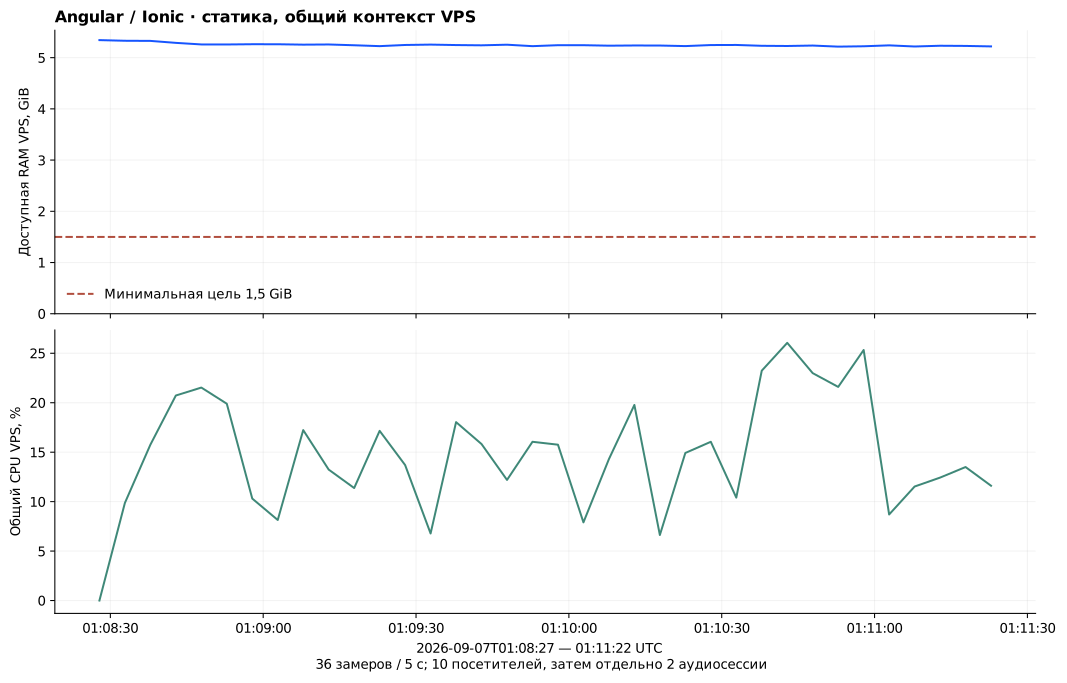
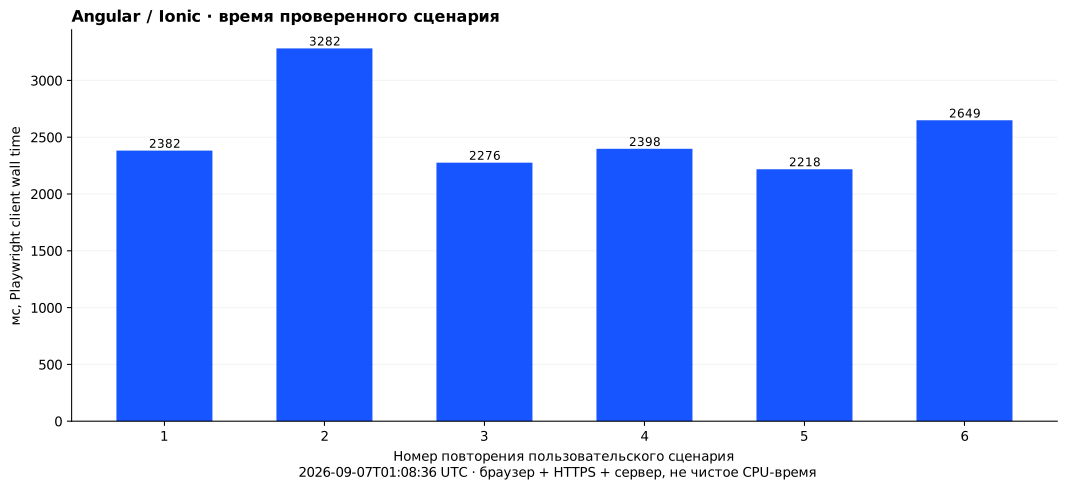
- 13 meaningful screenshots of the actual interface retained.
- Each screenshot includes its date, scenario and code revision.
- No separate backend process runs on the VPS: Nginx serves static files. Shared Nginx resources cannot fairly be attributed to a single site.
- 6 scenario repetitions measured; median 2390.0 ms, maximum 3282 ms. Timing includes the browser and HTTPS; methodology and limitations are included.
Running and operating
On desktop, the demo runs in a phone frame with a same-origin iframe. At widths up to 600 px, the shell disappears and the app fills the screen. The URL follows navigation; direct links and page refresh were checked.
Charts from 7 September, 01:08–01:11 UTC, predate the visual update. They provide static-hosting context for the previous version, not a new measurement of mobile interface performance.
The original app gets schedules from a server. This demo uses a local test dataset, as noted in the interface.
The Angular production build runs outside the VPS. Ready-to-serve files are transferred to the server and served by Nginx over HTTPS. This demo has no persistent Node.js process.
Check /healthz, direct routes after refresh, sign-in, form save and cancel. Roll back by pointing current to the retained release directory. Data is restored from the built-in dataset.
Builds run outside the VPS; the server receives static files and versioned images. Secrets are kept separately. Logs rotate; changing log options requires recreating the container. No server-wide docker prune.
The code map links a screen or API to its module and data. A change needs those links checked, the map updated and the affected flows rerun: normal path, error, retry and reset. Diagrams can go stale, so their version is listed alongside them.
Rollback checked at 2026-09-07T00:59:39.939043+00:00: 20260907-verified → 20260907 → 20260907-verified. HTTPS, readiness and SHA were confirmed after each switch. This checks configuration and artifacts at one verified SHA; no reverse database migration was performed.
Stack
| Angular 17 | Page components, forms, routing and state. |
|---|---|
| Ionic 7 | Navigation, controls, modal forms and a responsive interface. |
| SlickGrid | Tabular views and row operations. |
Materials and source code
The repository contains a source snapshot dated 1 May 2024; this does not establish when development began. Demo: 7 September 2026.
The evidence archive retains its original language.